PodShorts: Create AI Podcasts, Viral Shorts & Monetized Content From One Topic
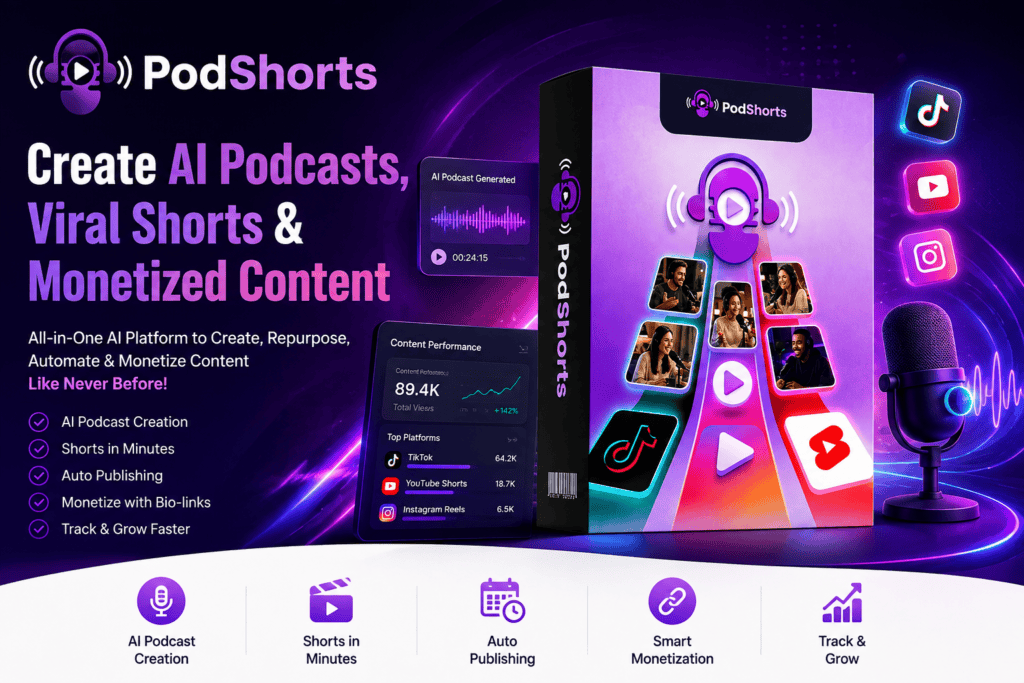
PodShorts is an AI-powered podcast creation platform that turns a simple topic into complete podcast episodes, short-form videos, AI-hosted content, social posts and monetized traffic — without recording, editing or manually publishing everything yourself.
Create consistent AI hosts, generate up to 15 vertical clips from each episode, publish to TikTok, Instagram and YouTube Shorts, and track clicks through a built-in monetized bio page.
PodShorts Premium currently starts at $37 one-time.
Check the latest price, availability and current offer on the official website.
Creating a podcast sounds simple until you actually try to do it.
You need topics. Then scripts. Hosts. Voices. Recording. Editing. Video. Captions. Short clips. Thumbnails. Social posts. Scheduling. And after doing all of that, there is still one awkward question: how will the content actually make money?
PodShorts takes a different approach.
Instead of giving you another isolated AI tool for one small part of the process, PodShorts is designed to create the podcast itself, turn each episode into short-form videos, publish those clips across social platforms, and connect the resulting traffic to monetization links.
In simple terms, you start with a niche or topic. The AI handles much of what normally happens between that idea and a published podcast content campaign.
You can create AI hosts, use a cloned version of your own face and voice, generate complete conversational episodes, produce up to 15 vertical clips from an episode, schedule those clips to TikTok, Instagram and YouTube Shorts, and track clicks through a monetized bio page. The current PodShorts Premium offer includes all seven core AI agents, one channel and up to 15 episodes per month.
What Is PodShorts?
PodShorts is an AI-powered podcast creation, repurposing, publishing and monetization platform.
That distinction matters.
There are already plenty of tools that take an existing video and cut it into Shorts. They can be useful, but they assume you have content to begin with.
PodShorts starts earlier in the workflow.
It can create the hosts and the original podcast episode before producing the short clips. According to the current product specifications, its seven core systems are TrendRadar™, CastStudio™, ShowForge™, ClipGenie™, Variation Engine™, AutoCast™ and ProfitRouter™.
Think of it less like a video editor and more like a small automated content production line.
You provide the direction.
The platform tries to handle the repetitive production work that follows.
PodShorts at a Glance
| Details | PodShorts |
|---|---|
| Product type | AI podcast and short-form content platform |
| Main purpose | Create, repurpose, publish and monetize podcast content |
| Podcast episodes | Approximately 3–10 minutes |
| Clips | Up to 15 vertical clips per episode |
| AI hosts | Ready-made AI hosts or cloned face and voice |
| Core platforms | TikTok, Instagram and YouTube Shorts |
| Monetization | Hosted bio-link pages and click tracking |
| Core AI systems | 7 |
| Current Premium price | $37 one-time |
| API keys required | No separate external API setup advertised |
| Beginner friendly | Yes, guided onboarding is included |
| Guarantee | 14-day guarantee according to published product information |
Here’s what most people don’t know: the interesting part of PodShorts isn’t simply the number of clips it can generate. It is the connection between content creation, distribution and monetization.
That is where the product begins to look different from a normal AI clipping application.
How Does PodShorts Work?
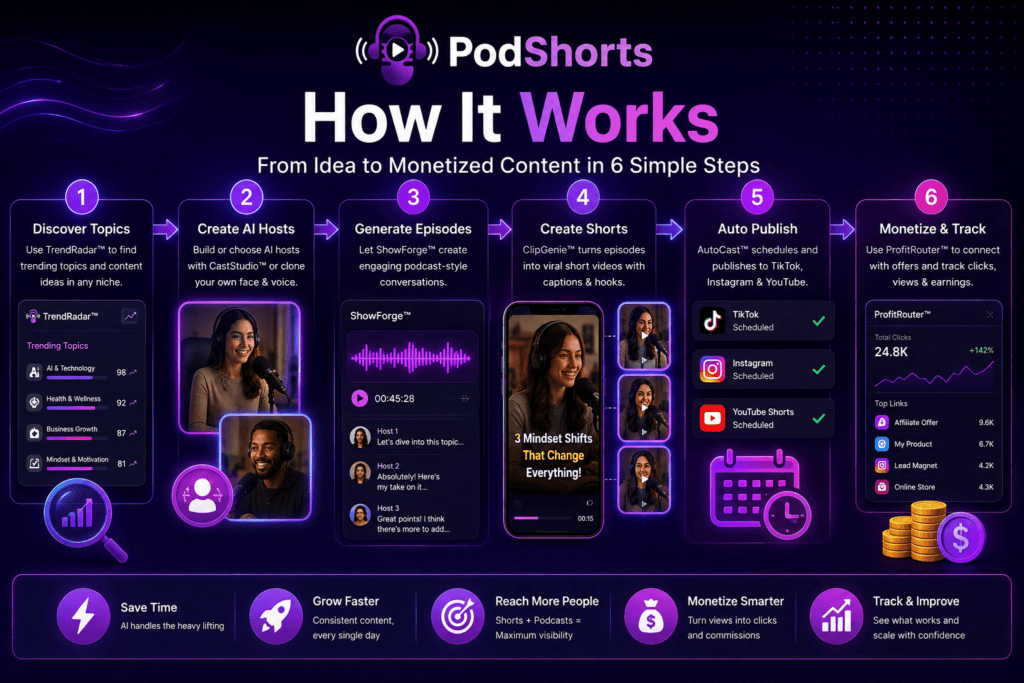
The workflow is fairly easy to understand once you separate it into stages.
Step 1: Choose Your Niche
You start by deciding what your podcast channel will be about.
That might be personal finance, fitness, technology, marketing, relationships, travel, real estate, local business or another niche.
TrendRadar™ is designed to scan podcast charts and short-form feeds for topics and formats gaining momentum. Instead of staring at a blank screen wondering what to publish, you can use those signals as a starting point.
This doesn’t mean every suggested topic will automatically become popular. Trends are signals, not guarantees. But having data-assisted topic discovery can remove a lot of guesswork.
Step 2: Build Your Cast
Next comes one of the more unusual parts of PodShorts.
CastStudio™ lets you create a recurring cast for the show.
You can choose ready-made AI hosts with different names, voices and personalities, or use a cloned version of your own face and voice. PodShorts supports casts of two to four AI hosts and is designed to keep those identities consistent between episodes.
Consistency matters more than it may seem.
A channel where the hosts change completely every day can feel like random AI content. A recurring cast gives the audience something recognizable.
Step 3: Enter a Topic and Generate the Episode
Once your cast is ready, give ShowForge™ a topic.
The system creates an original podcast conversation of roughly 3–10 minutes, including multiple speakers, turn-taking and conversational exchanges rather than simply presenting one long block of narration. It can also suggest different angles for the topic before generation.
Imagine entering:
“Renting vs buying a home in your 30s.”
Instead of writing the entire discussion yourself, you could have one AI host make the case for buying while another challenges the assumptions.
That conversational format is important because it gives ClipGenie™ multiple opinions, hooks and moments to work with later.
Step 4: Turn the Episode Into Shorts
This is where the name PodShorts starts making sense.
ClipGenie™ can automatically extract up to 15 vertical clips from an episode. Clips are designed for short-form feeds and can include burned-in captions, hooks, rights-cleared music and individual virality scores.
Instead of producing one podcast and then manually searching through the timeline for usable moments, the software handles the first pass.
You can then re-cut, edit captions or regenerate clips when necessary.
Step 5: Create Different Versions for Each Platform
The biggest mistake people make with content repurposing is assuming that “post everywhere” means “upload exactly the same file everywhere.”
PodShorts uses its Variation Engine™ to adjust elements such as captions, hashtags, on-screen hooks, framing and visual treatment for different platforms. A fingerprint check is also designed to identify content variants that are too similar before publication.
This is a thoughtful feature because TikTok, Instagram and YouTube may all be short-form platforms, but users do not necessarily interact with content in exactly the same way on each one.
Step 6: Schedule and Publish
AutoCast™ handles the distribution side.
The core version supports direct publishing to:
- TikTok
- YouTube Shorts
You can create a drip schedule instead of releasing every clip at once. PodShorts also includes a content calendar, staggered publishing times, AI-content labeling and retry handling for failed posts.
For someone managing content alone, this could be one of the biggest time-saving parts of the platform.
The 7 Main PodShorts Features Explained
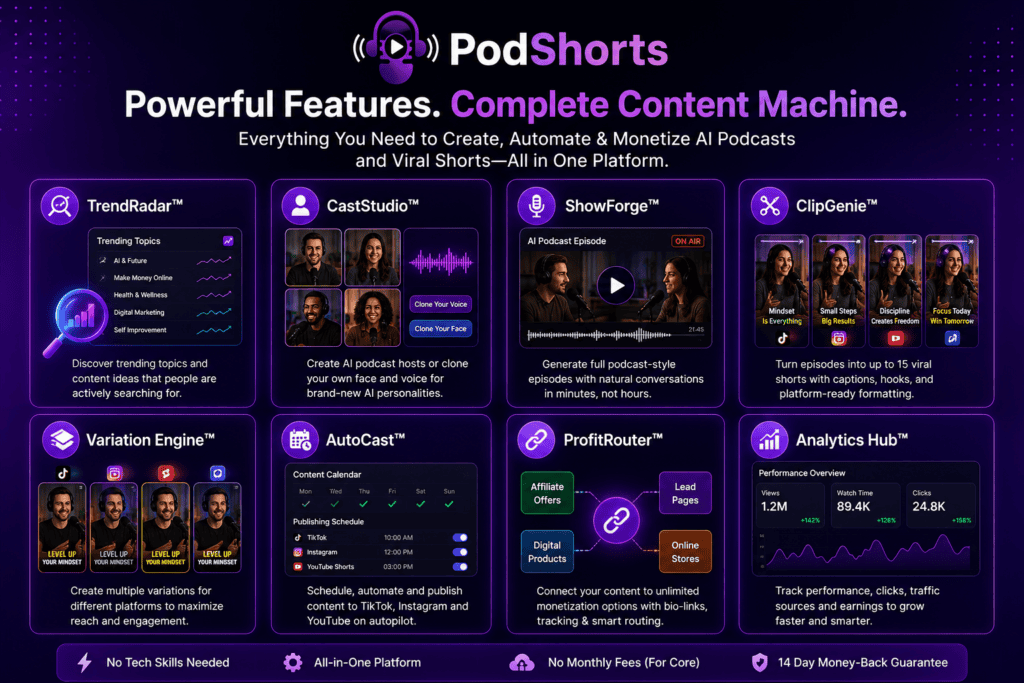
PodShorts divides the workflow between seven specialized AI systems.
1. TrendRadar™ – Topic Discovery
TrendRadar looks for topics and content formats showing momentum in your niche.
Instead of asking AI to randomly generate “20 podcast ideas,” the goal is to begin with subjects that already appear to be attracting attention.
It can also preload a selected format into the next episode workflow.
2. CastStudio™ – AI Podcast Hosts
CastStudio handles the people viewers see and hear.
You can:
- create a version of yourself using face and voice cloning;
- choose ready-made AI personalities;
- use two to four hosts;
- keep the same cast across multiple episodes.
For creators who dislike recording themselves, this feature changes the economics of maintaining a consistent video podcast presence.
3. ShowForge™ – Full Episode Creation
ShowForge creates the actual episode.
Current product information describes 3–10 minute conversations with natural turn-taking, interruptions, different viewpoints and animated host visuals.
The important word here is episode.
PodShorts isn’t simply producing a 30-second AI video and calling it a podcast.
4. ClipGenie™ – Short-Form Repurposing
ClipGenie turns the longer conversation into short vertical videos.
It can generate up to 15 clips from an episode and add captions, music and hooks automatically. Each clip also receives a virality score designed to help you identify stronger candidates.
Of course, a “virality score” cannot guarantee views. Treat it as a prioritization tool rather than a promise.
5. Variation Engine™ – Platform-Specific Content
The Variation Engine changes the presentation of clips for different platforms.
This includes elements such as:
- hooks;
- captions;
- hashtags;
- framing;
- visual treatment.
This means your Instagram version does not have to be an identical copy of the TikTok post.
6. AutoCast™ – Social Publishing
AutoCast schedules and publishes the clips.
The standard PodShorts setup currently focuses on TikTok, Instagram and YouTube Shorts. Users who need significantly wider syndication can look at the separate Amplify upgrade.
7. ProfitRouter™ – Monetization and Tracking
ProfitRouter is probably the feature that most clearly explains the “money-making podcast” positioning.
Each channel can have a hosted monetized bio-link page. Users can add their own links, and the system can suggest offers related to the channel’s niche.
It can also track clicks from individual clips and rotate offers based on conversion performance.
Your “money link” doesn’t have to be an affiliate product. It could lead to your own product, ecommerce store, lead-generation page, service or another destination.
What Makes PodShorts Different From a Normal AI Clipping Tool?
A normal clipping workflow looks something like this:
Record podcast → edit podcast → upload podcast → import into clipping tool → create Shorts → export clips → write captions → upload individually → add monetization links.
PodShorts tries to compress that into:
Choose topic → generate show → generate clips → schedule posts → track traffic.
That doesn’t make human judgment unnecessary.
You still need to choose a sensible niche, check generated content, select appropriate offers and learn what your audience responds to.
But it removes several production bottlenecks.
To be honest, this is the part I find more interesting than simply saying “AI makes 15 clips.” Creating clips is becoming common. Connecting the original episode, recurring AI cast, multi-platform publishing and monetization inside one workflow is the more meaningful idea.
PodShorts Pricing
The current introductory price for PodShorts Premium is $37 one-time. The published Premium package presently includes one channel, all seven main AI systems, 15 episodes per month and up to 15 automatically generated clips per episode.
There are also optional upgrades for users who need more scale, client management, wider distribution or AI-assisted growth guidance.
| Offer | Current Price | Best Suited For |
| PodShorts Premium | $37 one-time | Starting a podcast content channel |
| FastPass | $230/year | Getting the main upgrades together |
| PodShorts Scale | $67 | Higher-volume channel creation |
| PodShorts Agency | $197 | Managing content for clients |
| PodCoach AI | $97/year | Data-based growth guidance |
| PodShorts Amplify | $67 | Publishing across more networks |
| Bundle Deal | $317/year | Buyers wanting the complete upgrade package |
| DFY Show Network | $197 | FastPass/Bundle buyers wanting prepared show networks |
Prices and promotional availability can change, especially during an introductory launch period.
PodShorts OTOs and Optional Upgrades
You do not need every upgrade simply because it exists.
That is worth saying clearly.
If you are testing one niche and primarily want to create podcast episodes plus Shorts for TikTok, Instagram and YouTube, start by evaluating the core version.
The upgrades become more relevant when your requirements expand.
PodShorts Scale increases capacity and is aimed at users operating multiple channels. Current published details list support for up to 10 channels along with larger generation limits, bulk creation and higher-grade voice/video models.
PodShorts Agency adds white-label and client-management tools for people selling content services.
PodCoach AI analyzes performance data and provides recommendations based on what is happening inside your own dashboard.
PodShorts Amplify expands distribution from three social platforms to 15 networks and also adds podcast distribution to Spotify and Apple Podcasts plus an SEO Blog Engine.
You can explore the complete funnel on our PodShorts OTO page or compare package options on the PodShorts Bundle page.
Who Is PodShorts For?
PodShorts makes the most sense for people who want the benefits of a podcast-led content strategy without building a traditional recording studio.
Affiliate Marketers
An affiliate marketer could create niche discussions around problems, products or market trends and connect interested viewers to relevant offers through a bio page.
Content Creators
Creators can use AI hosts or clone their own face and voice to publish more consistently without recording every piece of content manually.
Agencies and Freelancers
With the Agency upgrade, a marketer could manage branded podcast-style content for local businesses or clients.
Coaches and Consultants
A consultant could turn recurring industry topics into conversations and Shorts instead of recording new talking-head videos every day.
Beginners
Someone without podcast equipment, editing skills or an established audience can use the guided workflow to reduce the technical barrier to getting started.
That said, PodShorts isn’t a magic traffic button. Publishing AI-generated content doesn’t automatically create an audience, and monetization links don’t guarantee commissions.
The quality of the niche, topics, offers and ongoing decisions still matters.
PodShorts Guarantee
PodShorts is offered with a 14-day money-back guarantee according to the currently supplied product information.
That gives buyers a limited period to access the platform, explore the workflow and decide whether it fits their needs.
Keep one distinction in mind: a refund guarantee is not an earnings guarantee.
There is no realistic software that can promise a particular number of views, followers, leads or commissions. The product’s own published disclaimer also states that income or success is not guaranteed.
Is PodShorts Worth Considering?
If your only requirement is trimming clips from videos you already record, PodShorts may be more platform than you need.
But if your bottleneck is the entire production process, the proposition becomes more compelling.
It combines topic research, AI hosts, episode generation, short-video repurposing, social scheduling and monetization tracking in one workflow.
That is the practical question to ask:
Are you looking for another editing tool, or are you trying to avoid building the podcast production machine yourself?
For the second use case, PodShorts is worth a closer look.
The $37 introductory price also makes the core version easier to evaluate before deciding whether higher-capacity upgrades are necessary.
Final Thoughts on PodShorts
PodShorts stands out because it tackles more than one piece of the content puzzle.
It doesn’t just help you create a podcast. It helps turn a topic into a complete AI-hosted episode, breaks that episode into short-form videos, prepares platform-specific versions, schedules them for social media, and connects the traffic to a monetized bio page.
That matters.
For most creators, the real problem isn’t coming up with one content idea. The problem is everything that comes after it: recording, editing, clipping, captioning, posting, repurposing and trying to stay consistent week after week.
PodShorts is designed to remove much of that production burden.
You still need good topics, a sensible niche and the right offers. No software can guarantee views, followers or income. But if your goal is to build a podcast-style content channel without spending hours behind a camera or inside an editing timeline, PodShorts offers a much simpler route.
The current PodShorts Premium offer starts at $37 one-time, making the core platform relatively accessible for anyone who wants to test the workflow before considering additional upgrades.
If the idea of turning one topic into a full podcast episode, multiple Shorts and a monetized content system sounds useful for your business, this is the best time to look at what PodShorts currently includes.
Check the latest price, availability, bonuses and offer details on the official PodShorts website.